
Blog
User Strategies
What Broken and Missing Links Do to Your SEO and UX
An internal link audit isn't just an SEO exercise — it shapes where users go next and which pages earn authority. Here's how to audit your internal links and what to fix first.

Lucky Orange
Most internal link audits get framed as a purely technical exercise. Run a crawl, find the broken links, fix the 404s, done. That framing misses the bigger problem.
Your internal link structure is also the map your visitors are using to navigate your site. Every link you add or remove changes the paths they take, the pages they discover, and — directly — whether they convert. An audit that only looks at what search engines can crawl is leaving half the value on the table.
This post covers what an internal link audit actually involves, what the most common issues cost you in both rankings and user behavior, and how to run one without making it a week-long project.
What internal linking actually does (and why it's worth auditing)
Internal links do three jobs simultaneously, and most people only think about one of them.
They distribute authority. Every page on your site has some amount of ranking potential. Internal links are how that authority moves around. A high-traffic blog post that links to your product page is passing some of its strength to that page. Sever the link — or never create it in the first place — and the product page is weaker than it needs to be.
They define your site's hierarchy for search engines. Google uses internal link patterns to understand which pages are most important. Pages that receive many internal links signal importance. Pages that receive none — orphan pages — are hard to find, hard to crawl, and rank accordingly. Your internal link structure is, in practice, a vote on which of your own pages matter most.
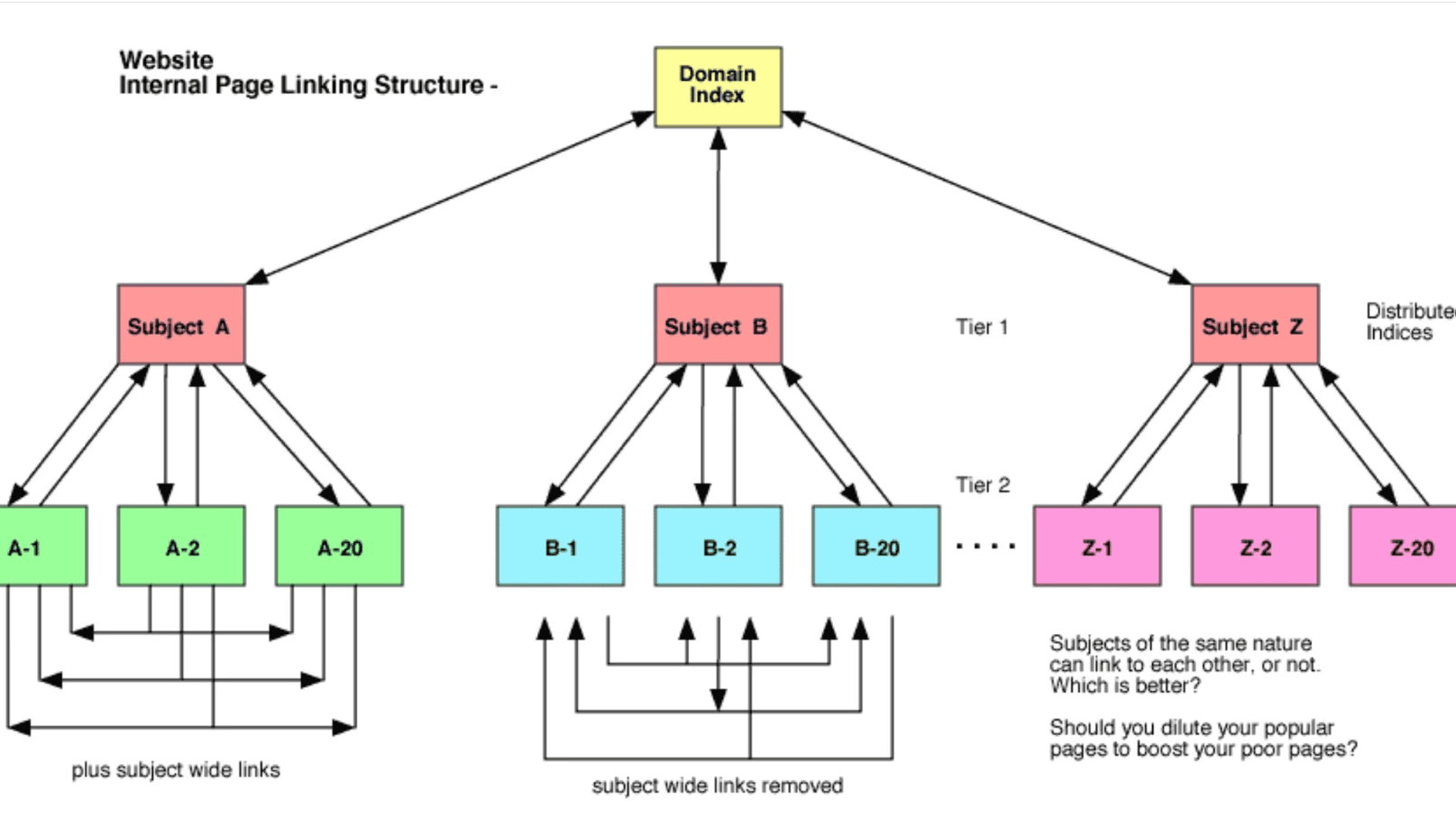
They shape the user journey. This is the part SEO guides gloss over. When a visitor lands on a blog post and sees a relevant internal link, they click it. Or they don't, and they leave. The links you place — where you put them, what anchor text you use, which pages they point to — are the navigation system for everyone who isn't using your main menu. A weak internal link structure means more users hitting dead ends, bouncing back to Google, and not converting
The five internal linking problems that actually move the needle
1. Orphan pages
An orphan page has no internal links pointing to it. It exists on your site, but nothing connects to it — which means users only find it by typing the URL directly or through an external link, and search engines either don't crawl it or crawl it rarely. Fixing orphan pages, broken links, and redirect chains tends to have an outsized impact on both rankings and conversions because the pages involved are often important ones that simply aren't getting the traffic they've earned.
This is especially common with older content. A page published two years ago that was never linked from anything newer is effectively invisible to most of your visitors.
2. Broken internal links
A link that pointed to a page that no longer exists. The user clicks, hits a 404, and is done. From a rankings perspective, the authority that should have passed through that link disappears. From a user perspective, it's a hard stop in whatever journey they were on.
A recent study on 23 million internal links found an extremely positive correlation between internal links and organic traffic — which means the inverse is also true. Broken internal links aren't just a nuisance; they're actively pulling pages down.
3. Weak or missing anchor text
"Click here" and "read more" are the two worst anchor text choices in internal linking, and they're everywhere. Anchor text tells Google what the destination page is about — it's a relevance signal. Generic anchor text wastes that signal entirely. The clickable text in your links tells search engines what the target page is about — "click here" wastes an opportunity.
The fix isn't complicated: use anchor text that describes the destination page's topic. "How heatmaps work" is better than "learn more." "Landing page conversion rate benchmarks" is better than "read our guide."
4. Redirect chains in internal links
If a page you're linking to internally has moved, and you're linking to the old URL that now redirects to the new one, you have a redirect chain. Every hop in a chain dilutes link equity slightly and adds latency. If that chain involves multiple redirects, the equity loss compounds and the page load slows.
The fix: wherever you find internal links pointing to URLs that redirect, update them to point directly to the final destination URL. It's tedious, but the equity recovery is real.
5. Pages with too many outgoing internal links
The counterintuitive one. A page that links to 200 other pages isn't passing meaningful authority to any of them — it's diluting everything. Google has acknowledged that it assigns less value to links on pages with excessive outgoing links. More isn't better. Internal links should be selective enough that each one carries actual weight.
How to run an internal link audit
You don't need an enterprise SEO platform to do this well. Here's a practical approach that works for most sites:
Step 1: Crawl your site and pull the link map
Screaming Frog (free up to 500 URLs, paid for larger sites) will crawl your entire site and produce a map of every internal link — source page, destination page, anchor text, and status code. Export this. It's the raw material for everything else.
Google Search Console's Links report shows you which pages have the most internal links pointing to them and what the top anchor texts are. It won't show broken links directly, but it's a fast way to see if your most important pages are actually receiving the most internal links — or if something is off.
Step 2: Find your orphan pages
Cross-reference your crawl output against your sitemap. Any page in your sitemap that has zero internal links pointing to it is an orphan. Sort by organic traffic — if a page with meaningful traffic has no internal links, that's a priority fix.
Step 3: Find broken internal links
In Screaming Frog, filter your link report by response code. Any internal link returning a 4xx or 5xx status is broken. Export the full list with source URLs so you can go back and update the links at their origin.
Step 4: Audit anchor text on your most important pages
Pick your 10 most important destination pages — typically your highest-value product, service, or conversion pages. Search your crawl export for all internal links pointing to each one. Look at the anchor text distribution. If most of the anchors are generic ("here," "this," "learn more"), you have an opportunity to add meaningful signal just by updating the link text on existing links.
Step 5: Check for redirect chains
Filter your crawl for internal links that return 3xx status codes. Those are links pointing to URLs that redirect rather than resolve directly. Update each one to the final destination URL.
Using Lucky Orange for internal linking strategy
This is where the behavioral layer comes in — and it's the part that pure SEO audits miss entirely.
Lucky Orange Discovery AI
Audit your internal link structure without a crawl tool
Discovery AI can read your site's code directly, which means it can identify internal linking issues on any page you point it at — missing links to related content, anchor text that's too generic, links pointing to redirects — and explain what to fix and why.
To run an audit: open Discovery, click the "Find broken links" prompt, specify the page, and it'll return every internal link issue it finds in that page's code. You can ask follow-up questions — "which of these is highest priority?" or "what should the anchor text be instead?" — and get specific answers without switching tools.
Pair it with your website heatmaps. If a page's click heatmap shows users clicking heavily in an area where there's no internal link, that's a missed opportunity Discovery can help you act on — you can ask it where the most logical link placement would be and what it should point to. Session recordings take it further: watch a real user hit a dead-end broken internal link and leave, and you have the business case for fixing it immediately.
Making internal linking part of your regular workflow
Internal link audits aren't one-and-done. New content creates new linking opportunities. Old content gets retired and creates new orphan risks. URL structures change. The problem compounds if you let it run unattended.
The practical approach: run a full internal link audit once a quarter, and do a page-level check with Discovery every time you publish new content or retire an old page. The full crawl catches systemic issues; the per-page check keeps new problems from accumulating.
The triggers that most commonly break internal link structure:
Publishing new content without linking to it from related existing pages
Retiring or consolidating pages without updating links that pointed to them
Changing URL structures without updating internal links to match
CMS migrations that alter URL patterns site-wide
Frequently asked questions
What is an internal link audit?
An internal link audit is a systematic review of all the links on your site that point from one of your pages to another of your pages. The goal is to find and fix problems — broken links, orphan pages, redirect chains, weak anchor text — and identify opportunities to add new links that would strengthen your most important pages.
How do broken internal links affect SEO?
Broken internal links cut off the flow of link equity between pages. A high-authority page that links to a dead URL is passing its authority nowhere — the value disappears rather than flowing to a page you want to rank. They also hurt user experience by creating dead ends, which elevates bounce rate and sends negative engagement signals to search engines.
What is an orphan page and why does it matter?
An orphan page is a page on your site that no other internal page links to. Search engines discover pages primarily by following links, so orphan pages are crawled infrequently and often rank poorly regardless of their content quality. Users can only reach them via direct URL or external link — which means most of your visitors will never find them.
How many internal links should a page have?
There's no universal number, but the principle is that every internal link on a page dilutes the authority passed by every other link. Pages with hundreds of outgoing internal links are passing very little weight through each one. A practical guideline: link to pages that are genuinely relevant to the content at hand, use descriptive anchor text, and avoid linking to the same destination multiple times on a single page.
How often should I run an internal link audit?
Quarterly for a full crawl-based audit. Per-page checks using a tool like Discovery should happen every time you publish new content, retire old pages, or make structural changes to your URL architecture.
What's the difference between an internal link audit and a site audit?
A site audit is broader — it covers technical SEO issues across your whole site including page speed, crawlability, indexing, schema, and security. An internal link audit focuses specifically on the links between your pages: whether they're working, where authority is and isn't flowing, and whether your link structure is guiding users and search engines toward your most important content.
Your internal link structure is a product decision, not just an SEO task
The sites that rank well and convert well treat internal linking as something they design deliberately — not something that just accumulates over time as content gets published. Every link is a decision about where users go next and which pages get stronger.
Most crawl tools give you a list of broken links. Discovery AI shows you the same issues in context — and lets you pair that with your heatmaps and session recordings to see exactly where users are navigating, where they're getting stuck, and where a better-placed internal link would have kept them moving toward a conversion.
Open Lucky Orange, click "Find broken links," point it at any page, and start with the pages that matter most.
Lucky Orange


