Blog
User Strategies
How to find and fix broken links
Broken links kill conversions and erode SEO. Learn what they are, how to find them on your site, and how to fix them, including how Discovery AI can audit any page for you.

Lucky Orange
Broken links don't announce themselves. They sit quietly on pages you published months or years ago, pointing to URLs that no longer exist — while real visitors click them, hit a 404, and leave. By the time you notice, the damage is already showing up in your bounce rate and your rankings.
This guide covers how to find broken links on your website, what's causing them, what they're actually costing you, and how to fix them. We'll also show you how Lucky Orange's Discovery feature can run a broken link audit on any page in seconds — no crawl tools required, no spreadsheets.
What is a broken link, exactly?
A broken link is any hyperlink on your site that returns an error when clicked — most commonly a 404 (page not found), but also 500-level server errors or redirect loops. They fall into two categories:
Internal broken links — links from one page on your site to another page on your site that no longer exists or has moved.
External broken links — links from your site to a third-party URL that has since been removed, restructured, or taken offline.
Both types are a problem, but internal broken links are higher priority. They disrupt the user journey you designed, bleed link equity away from pages that should be receiving it, and signal to search engines that your site isn't being maintained.
Why broken links are more common than you think
According to Semrush, 42.5% of websites have broken internal links — and that's not a sign of negligence, it's a sign that sites evolve. Pages get restructured. Products get discontinued. Blog posts get consolidated. URLs change without redirects being set up. Every one of those events creates the conditions for a broken link.
What broken links are actually costing you
Conversions
A broken link in a purchase flow, a pricing page CTA, or a support article is a conversion killer. The user had intent, clicked, and got an error. Most won't try to navigate around it — they'll leave. If that broken link sits anywhere in your funnel, you're losing customers who were ready to act.
Bounce rate and engagement signals
When a visitor lands on a 404, they almost always go back. That early exit registers as a bounce, signals to search engines that your page didn't deliver what the user expected, and puts downward pressure on rankings over time. Not dramatic on a single instance — significant when it's happening repeatedly across multiple pages.
Link equity
Internal links pass authority from high-traffic pages to pages you want to rank. A broken internal link severs that connection. The link equity that should have flowed through simply disappears, leaving your target pages weaker than they should be.
Crawl budget
There's one more effect that's easy to miss if you're not thinking like a search engine. Search engine crawlers follow links. When they repeatedly hit dead ends, they waste crawl budget on error pages instead of discovering and indexing the pages you actually want ranked. On large sites, this compounds fast.
How to find broken links on your website
There are several ways to surface broken links, ranging from free manual methods to crawler-based audits. Here's the practical breakdown:
Google Search Console (free, covers crawl errors)
Search Console's Coverage report shows pages that returned errors during Googlebot's crawl. It won't catch every broken link — only those that Google has attempted to crawl — but it's a reliable starting point and free. Go to Index → Pages and filter for "404 Not Found." Export the list.
Lucky Orange Discovery AI
Run a broken link audit without leaving Lucky Orange
Discovery — Lucky Orange's AI assistant — can now read your site's code directly. That means it can scan a page for broken links, return a list of every dead URL it finds, and explain the fix — all in a conversational interface that lets you ask follow-up questions without switching tools.
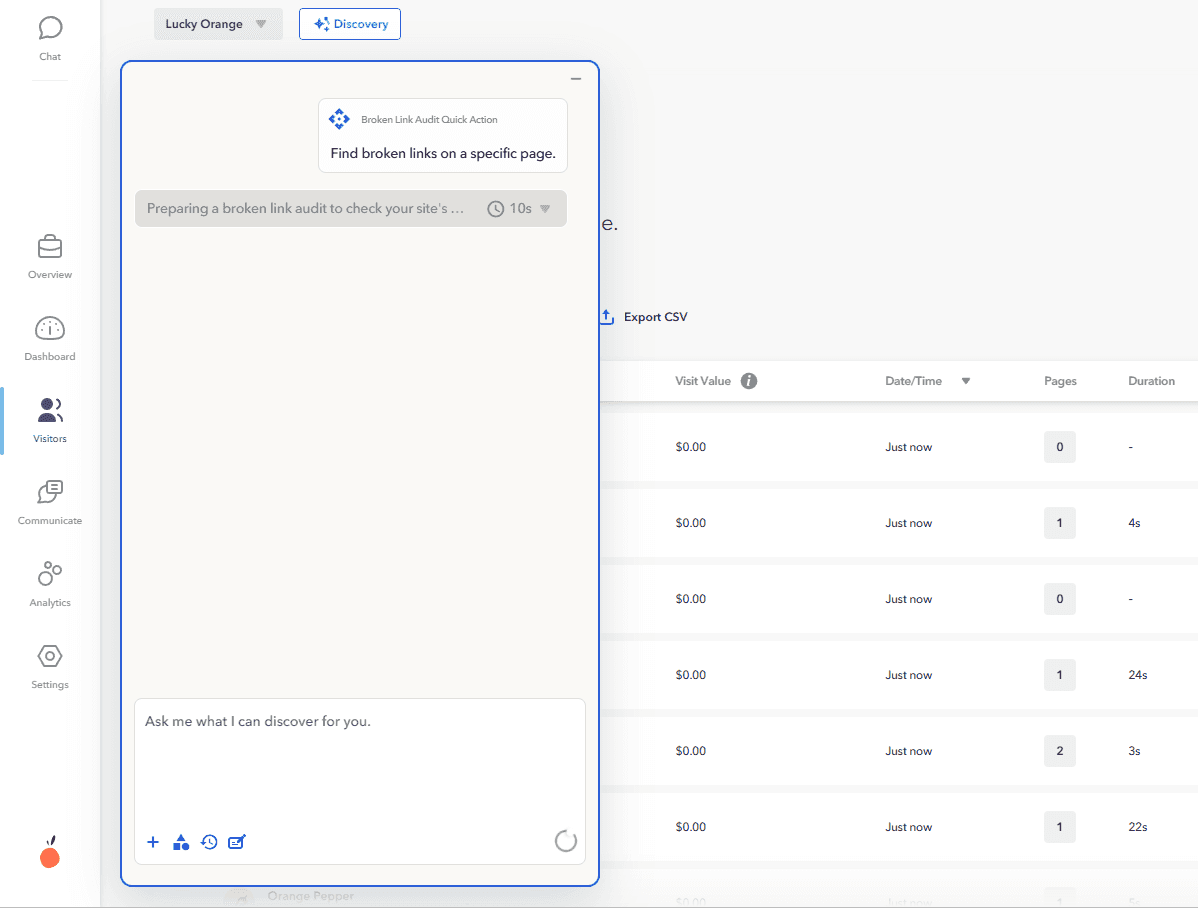
To run an audit: open Discovery, click the "Find broken links" prompt, and tell it which page you want to check. It'll scan the code of that page and return every broken link it identifies, with the source anchor text and the dead URL.
This pairs naturally with your heatmaps and session recordings. If Discovery surfaces a broken link on a page where your click heatmap shows heavy activity on that link location, you know exactly how many users have been hitting that dead end — and how urgent the fix is.
Screaming Frog (crawler-based, thorough)
Screaming Frog crawls your site the way a search engine does, following every link it finds and flagging the response code for each one. Free up to 500 URLs. For larger sites, the paid version runs full-site crawls. Export all 4xx and 5xx status codes and sort by source page.
Ahrefs or Semrush (backlink + internal link combined)
If you want internal and external broken links in one pass — including links from other sites pointing to dead pages on yours — Ahrefs's Site Audit and Semrush's Site Audit both cover it. More expensive, but useful if you're already in those tools.
Manual spot-check on key pages
For high-priority pages — your homepage, primary product or pricing pages, top-traffic blog posts — a manual review is fast and often enough. Open the page, click every link, note any that return errors. Takes 10 minutes and catches the issues that matter most.
How to fix broken links
To fix a broken link, you have three options depending on why it broke: update the link to the correct URL, redirect the old URL with a 301 if the page moved, or remove the link entirely if the destination is gone for good. Start with the broken links on your highest-traffic pages — those are the ones costing you visitors and rankings right now. Fix internal links directly in your CMS; for broken outbound links, either point them at a working equivalent or drop them.
Sort broken links by the traffic of the page they live on. A broken link on your homepage or a top landing page matters more than one on a five-year-old post nobody visits. Fix in that order.
Diagnose why each link is broken. Typos in the URL, a page you moved or renamed, a deleted page, or an external site that changed its structure each call for a different fix.
For internal links: update the URL or add a 301 redirect. If the destination still exists at a new address, update the link or redirect the old path. If it's gone, link to the closest relevant page instead.
For outbound/external links: replace or remove. Point to a working equivalent if one exists; if not, remove the link so you're not sending visitors into a dead end.
Re-test the fixed links. Confirm each now returns a 200, not another redirect chain or 404.
Watch how real visitors behave on the fixed pages. A link can technically resolve and still send people somewhere unhelpful — behavior tells you whether the fix actually worked.
Say a session recording shows visitors landing on your "Pricing" page from an old blog post, clicking a "See plans" button, and hitting a 404. The link points to /plans, but you renamed that page to /pricing six months ago. The fix is a two-minute 301 from /plans to /pricing — but you'd never have prioritized it if you hadn't seen paying-intent visitors dead-ending on it. That's the difference between a crawler's list of 404s and knowing which broken links are actually losing you conversions.
A crawler tells you what's broken. Session recordings and heatmaps tell you which broken links real visitors are hitting — so you fix the ones bleeding conversions first, not just the ones at the top of an alphabetical export.
Broken external links
Find the updated URL — check if the destination site has moved the content and update your link accordingly.
Link to an alternative source — if the original source is gone, find an equivalent source covering the same information and swap the link.
Use the Wayback Machine — if you need to verify what the original content said, archive.org can often surface a cached version to help you find a replacement source.
A note on redirect chains
While fixing broken links, watch for redirect chains — cases where a URL redirects to another URL that redirects again. These slow page load, dilute link equity, and can eventually break if an intermediate redirect expires. Whenever possible, update links to point directly to the final destination URL rather than relying on a chain of redirects.
Making broken link checks part of your routine
A one-time audit is useful. A recurring process is what keeps broken links from accumulating.
The triggers that most commonly create broken links:
Site migrations or CMS changes
URL restructures or consolidations
Product or service pages being retired
Deleting old blog posts without redirecting them
External sites changing or removing content you've linked to
At minimum, run a broken link check after any significant site change and on a quarterly basis otherwise. For ecommerce sites where product pages turn over regularly, monthly is better.
Discovery makes it easy to spot-check individual pages as part of your regular UX review — run it alongside a session replay or heatmap review session and you're covering both the technical and behavioral picture at once.
Frequently asked questions
How do I check a website for broken links for free?
Google Search Console's Coverage report shows crawl errors at no cost. For a more thorough scan of your full link structure, Screaming Frog is free for sites up to 500 URLs. Discovery in Lucky Orange can also scan individual pages for broken links directly from within your analytics workflow.
Do broken links hurt SEO?
Yes, in several ways. They create a poor user experience that elevates bounce rates — a negative engagement signal for search engines. Broken internal links sever the flow of link equity through your site, weakening pages that depend on that authority to rank. And repeated crawl errors signal to Google that the site isn't being actively maintained, which affects how frequently and completely it's crawled.
Beyond SEO, broken links are bad news for your conversion rate with how they disrupt the user experience.
What's the difference between a 404 error and a broken link?
A broken link is the hyperlink itself — the anchor tag pointing to a URL that doesn't load. A 404 error is the response code returned when you follow that link. Not all broken links return 404s (they can return 500-level server errors or timeout), but 404s are the most common result of a broken link.
How often should I audit for broken links?
After any significant site change — a URL restructure, CMS migration, or product page removal — immediately. Otherwise, quarterly is a reasonable minimum for most sites. Ecommerce sites with high product page turnover benefit from monthly checks.
Can broken links be fixed automatically?
Not truly automatically, because fixing a broken link requires a judgment call — redirect to a new URL, remove the link, or swap in a replacement. What you can automate is the detection. Tools like Screaming Frog, Search Console, and Discovery can flag broken links on a schedule so you're reviewing a list rather than doing a manual crawl yourself.
What's the fastest way to find broken links on a specific page?
In Discovery: click the "Find broken links" prompt, specify the page, and it'll return all broken links it finds in that page's code. Alternatively, Screaming Frog's crawl mode with a custom start URL will crawl a single page's links quickly. Google Search Console's URL Inspection tool can also show crawl issues for individual URLs.
How do you fix a broken link?
Fix a broken link one of three ways: update it to the correct URL, 301-redirect the old address if the page moved, or remove the link if the destination is permanently gone. Prioritize broken links on your highest-traffic pages first, since those cost you the most visitors and ranking equity. After each fix, re-test the link to confirm it returns a 200.
Find broken links before your visitors do
Broken links are one of the few site issues that simultaneously hurt your SEO, your conversions, and your credibility with every single visitor who encounters one. The fix is straightforward — the hard part is finding them.
Most crawl tools give you a list. Discovery shows you which broken links are actually getting clicked — so you fix the ones costing you conversions first, not last. Open Lucky Orange, click "Find broken links," and get a full audit of any page in seconds. Then pull up your heatmap and see exactly how much traffic has been hitting that dead end.
Lucky Orange


