Blog
Conversion Rate Optimization
Internal Linking: How to Build a Strategy and Measure It
Your internal links decide how visitors move through your site and how Google spreads authority across it. Here's how to build a strategy you can measure.

Lucky Orange
Internal linking is a powerful tool for boosting site traffic. It connects pages within your website, enhancing navigation and user experience.
But what is internal linking? And why is it crucial for SEO success? This guide presents an Internal Linking Strategy to Boost Site Traffic | Lucky Orange readers can adapt without overhauling existing content.
Internal links distribute page authority, guiding users to related content and keeping them engaged longer.
They also help search engines understand your site's structure, improving crawlability and indexing.
In this guide, we'll explore effective internal linking strategies to maximize your site's traffic and SEO potential.
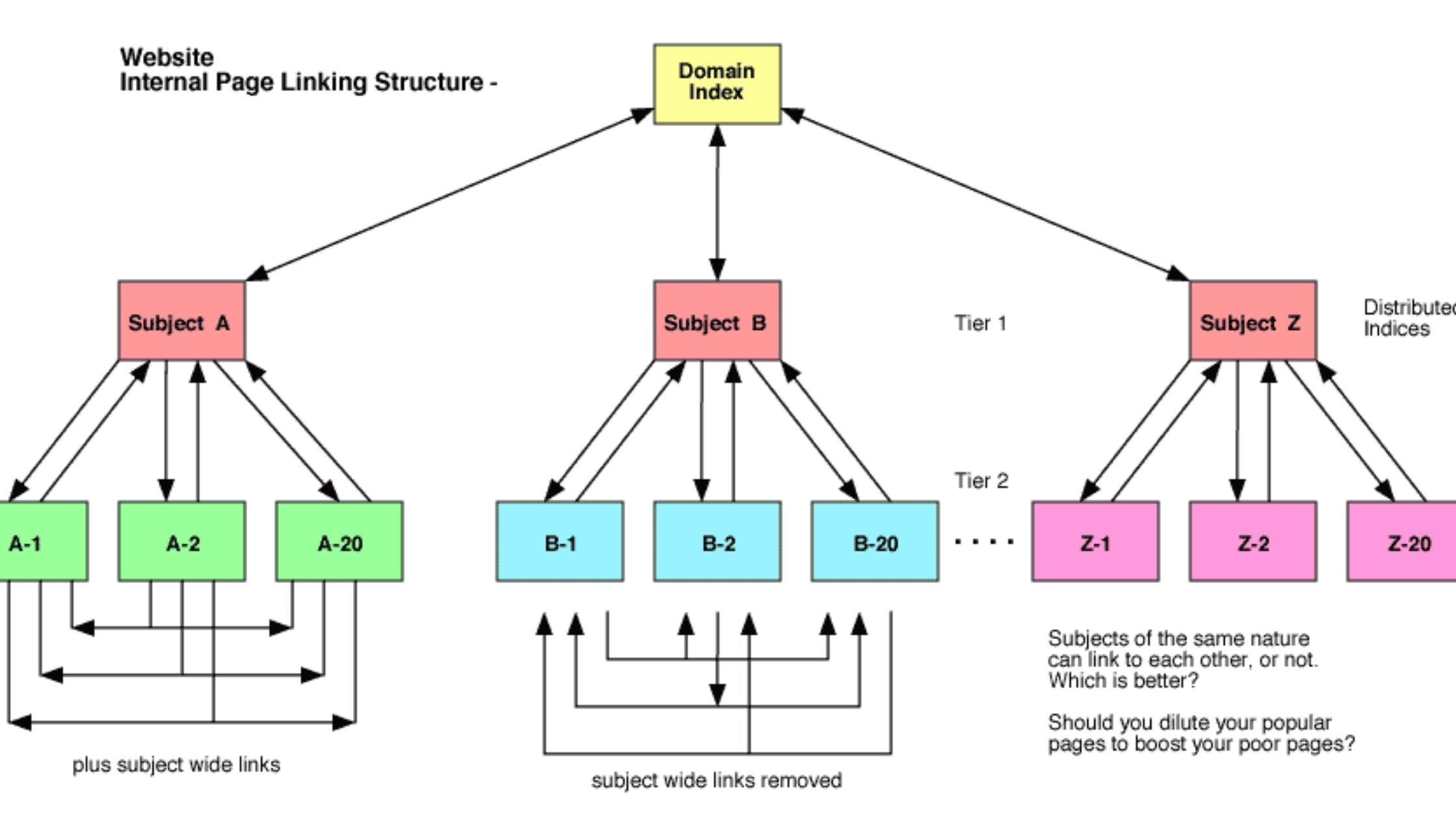
Image: WebSpero
What is Internal Linking? Understanding the Basics
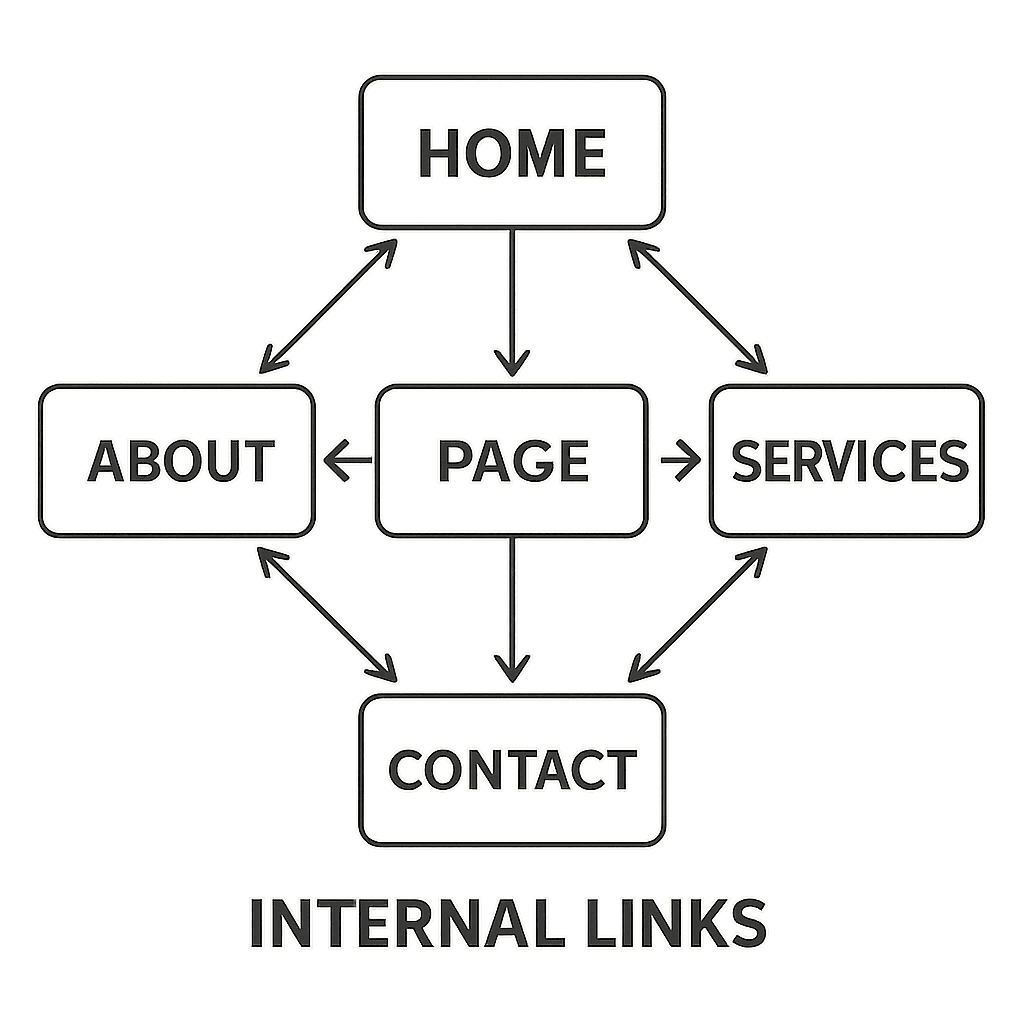
Internal linking involves connecting different pages on the same website. It's a fundamental part of any SEO strategy. In simple terms, what are internal links? An internal link points from one page on your domain to another page on the same domain.
These links guide users from one page to another, improving navigation. They play a crucial role in how search engines index your site.
Key Features of Internal Links:
Connects pages within the same domain.
Distributes ranking power and page authority.
Enhances user and search engine navigation.
Understanding internal links means recognizing their SEO potential. A well-thought-out linking strategy can drive significant site traffic.
Using internal links allows search engines to understand your site's hierarchy and structure. This understanding directly impacts how pages are ranked.
To maximize the benefits, focus on creating natural, relevant links that add value to your content. This approach is not only user-friendly but also SEO-friendly.
Why Are Internal Links Important for SEO?
Internal links are vital for SEO because they help distribute link equity across your site. This ensures that important pages get the attention they deserve. Do internal links help SEO? Absolutely—they enhance crawl paths, distribute equity, and reinforce topical relevance.
These links enhance your site's crawlability, allowing search engines to index your content more effectively. An accessible site structure can lead to better rankings.
Benefits of Internal Linking for SEO:
Improves crawlability and indexing.
Distributes ranking power.
Highlights important pages.
Moreover, internal links assist search engines in understanding your site's content hierarchy. This understanding is crucial for positioning in search results.
Another benefit is an improved user experience, which correlates with better SEO performance. Engaged users tend to stay longer and explore more pages.
How Internal Links Work: Site Structure and User Experience
Internal links form the backbone of your website's navigation. They guide users and search engines through your content seamlessly.
These links connect related pages, contributing to a logical site structure. A clear structure is user-friendly and improves navigability.
Key Roles of Internal Links:
Connect related content
Simplify navigation
Strengthen site architecture
When your site is easy to navigate, users can find what they're looking for quickly. This enhances the overall user experience and satisfaction.
Moreover, well-placed internal links can improve engagement by encouraging visitors to explore related topics. This results in users spending more time on your site, which is beneficial for SEO.
Types of Internal Links and Their Roles
Internal links come in several forms, each serving a unique purpose. They contribute to both user navigation and SEO.
Common Types of Internal Links:
Navigational Links: Found in menus and sidebars, helping users find key pages.
Contextual Links: Embedded in the content to lead users to related information.
Footer Links: Offer additional navigation options, often for policies or contact pages.

by Pankaj Patel (https://unsplash.com/@pankajpatel)
Each type plays a role in directing traffic and distributing authority across your site. Navigational links improve user access to essential content, while contextual links enhance the depth of user engagement. By understanding the roles of these links, you can craft a more strategic internal linking structure that supports your site's overall SEO goals.
Key Internal Linking Strategies to Boost Site Traffic
Internal linking is crucial for boosting site traffic and optimizing SEO. Implementing effective strategies involves more than just linking pages.
Top Internal Linking Strategies:
Topic Clusters: Build clusters around central themes.
Descriptive Anchor Text: Ensure relevance and context.
Linking New and Old Content: Keep content interconnected.

by Hal Gatewood (https://unsplash.com/@halacious)
These linking strategies make navigation seamless and enhance site authority. You should review your linking regularly to identify opportunities for growth. With internal linking, a strategic approach can magnify your SEO efforts significantly.
1. Create Topic Clusters and Content Hubs
Topic clusters organize content around a central theme, enhancing user navigation. They encourage deep diving into a subject area.
Content Hubs: Serve as focal points for topic-related content.
Content hubs tie related articles to a main topic, guiding users efficiently.
Creating clusters ensures comprehensive coverage of a subject, boosting your site's content authority. This method supports indexing by search engines, improving your site's visibility and SEO performance.
2. Use Descriptive and Relevant Anchor Text
Anchor text should be relevant and descriptive, providing a clear idea of the linked content.
Guidelines for Anchor Text :
Be concise but descriptive.
Avoid generic terms like "click here."
Using effective anchor text helps search engines understand page context, improving ranking potential. It also enhances user experience by clarifying link destinations.
3. Link New Content to Old (and Vice Versa)
Linking new content to old enriches the site's network of information. It maintains a fresh and dynamic flow across your website.
Linking Approaches :
Integrate links naturally within content.
Use context to guide link placements.
This strategy aids in distributing link equity, keeping older posts relevant. It encourages revisiting older pages, thereby boosting overall traffic and SEO effectiveness.
4. Identify and Fix Orphan Pages
Orphan pages lack links from other parts of your site. Identifying them is crucial for improving site structure.
Orphan Page Fixes :
Conduct audits to locate these pages.
Add strategic links to integrate them into your content network.
Ensuring these pages are linked increases their visibility and enhances site navigation, fostering a more cohesive site experience.
5. Prioritize High-Value and Conversion Pages
Focus on linking to pages that drive user engagement and conversions. Prioritized pages should naturally attract more internal links.
Priority Linking Methods :
Highlight product pages or lead magnets.
Use analytics to identify top performers.
Emphasizing these pages can boost their authority and contribute to higher conversion rates. This strategy supports overall traffic increases and helps achieve business goals.
Finding Internal Linking Opportunities
Identifying internal linking opportunities is key to enhancing your site's SEO. Start by performing a content audit to uncover areas lacking links. An audit helps pinpoint content that could benefit from increased interconnectivity.
Steps to Identify Opportunities :
Use SEO tools like Google Search Console.
Analyze visitor behavior for popular content.
Examine existing content clusters for gaps.
By leveraging these tools and techniques, you can discover unlinked pages and integrate them into your site's structure. This ongoing process increases site coherence and value, ensuring no page is left disconnected.
Best Practices for Effective Internal Linking
To excel in internal linking, always maintain a user-first mindset. Your links should feel intuitive and helpful for site visitors. Focus on creating a seamless navigation experience across your site content.
Make sure your anchor text is both descriptive and relevant. Clear and concise anchor text improves user understanding and aids search engine recognition. Consistent use of descriptive text strengthens link significance.
Top Best Practices :
Prioritize user experience in your linking strategy.
Ensure links enhance the flow of information naturally.
Regularly audit your links for broken or ineffective paths.
By adhering to these practices, you enhance both the navigability of your site and its SEO potential. Building effective connections between content boosts user engagement and search engine visibility.

by Joachim Schnürle (https://unsplash.com/@joa70)
Common Internal Linking Mistakes to Avoid
Avoid common pitfalls to ensure your internal linking strategy is effective. Overloading a page with links can confuse users and dilute link value.
Make sure every link adds value by being relevant and logical. Internal links should naturally complement the content they are embedded in.
Avoid These Mistakes :
Linking too frequently without purpose.
Using vague or non-descriptive anchor text.
Forgetting to update broken or outdated links.
By steering clear of these mistakes, you can maintain a clean, efficient linking structure that benefits both users and search engines.
Tools and Resources for Internal Link Optimization
Optimizing internal links doesn't have to be daunting. Numerous tools can streamline this process and improve results. These resources offer insights into link structures and help identify areas needing improvement.
Consider using tools like Google Search Console for detailed reports. Also, SEO software such as Screaming Frog can identify broken links and audit site architecture.
Recommended Tools :
Google Search Console
Screaming Frog SEO Spider
Ahrefs for comprehensive link analysis
Utilizing these tools effectively ensures that your internal linking strategy is robust and beneficial for both users and search engines.
Measuring the Impact of Your Internal Linking Strategy
Evaluating your internal linking strategy is crucial for optimizing results. Various metrics can indicate success and areas for improvement.
Monitor these key performance indicators (KPIs) to measure impact:
Key Metrics :
Organic traffic growth
Time spent on page
Bounce rate reduction
Tracking these metrics helps assess link effectiveness and guide future strategies. Adjust and refine your approach based on these insights for continual improvement.
Conclusion: Make Internal Linking a Core SEO Tactic
Internal linking is not just a technical SEO task. It is a powerful tool to boost your site's visibility and engagement. By strategically implementing internal links, you can enhance user experience and improve search rankings.
Prioritize internal linking in your SEO strategy. Continuously optimize your site and watch your traffic grow. This approach not only benefits search engine crawlers but also keeps users engaged, encouraging them to explore more of your content.
Frequesntly asked questions about internal linking strategy
Question: Do I need to overhaul existing content to implement this internal linking strategy?
Short answer: No. This strategy is designed to be adapted without rewriting your site. Start by adding natural, relevant links within existing articles, connect new pieces to older ones (and vice versa), prioritize linking to high-value or conversion pages, and fix orphan pages by weaving them into related content or hubs. Regularly review and refine links so they remain helpful and aligned with your site’s structure.
Question: How exactly do internal links improve SEO and traffic?
Short answer: Internal links distribute ranking power to important pages, clarify your site’s hierarchy, and create better crawl paths for search engines—leading to improved crawlability and indexing. They also enhance user navigation and engagement, encouraging visitors to explore related topics, stay longer, and view more pages—signals that often correlate with stronger search performance and more traffic.
Question: What makes effective anchor text for internal links?
Short answer: Keep anchor text concise, descriptive, and directly relevant to the destination page. Avoid vague phrases like “click here.” Clear, context-rich anchors help users understand where a link goes and help search engines interpret the linked page’s topic, which supports stronger relevance and ranking potential.
Question: How do I build topic clusters and content hubs?
Short answer: Start with a central “hub” page that covers a core theme broadly. Link this hub to focused, related articles (the “cluster”), and ensure those articles link back to the hub and to each other where relevant. This structure improves navigation, reinforces topical relevance, increases content depth, and supports better indexing and visibility.
Question: How can I find and fix orphan pages?
Short answer: Run content and technical audits to locate pages with no internal links pointing to them. Use tools like Google Search Console and Screaming Frog to surface these gaps. Then add strategic links from relevant articles, content hubs, or navigational areas to integrate those pages into your site’s structure and improve their visibility. Regularly repeat audits to catch new orphans.
Lucky Orange


